Every social media tool has AI now. The question is: how much of the work does it actually do?
By 2026, every major tool added AI. Hootsuite has OwlyWriter + Blue Silk summaries. Sprout has AI Assist. Buffer has Assistant. Later has Smart Scheduling. Metricool has caption + hashtag generation. The basic-AI gap is closed.
What separates tools now is what the AI can do beyond captions: generate images and video, learn your brand voice, run multi-step automations, classify and reply to DMs, build flows from natural language. This list ranks 8 tools by that depth — not by platform coverage or calendar UX.
We build SonetHub, so we listed it first. But we gave it the same critical treatment as everything else. If another tool does something better, we say so.
1. SonetHub — AI-native agent that runs the whole workflow
Pricing: Free (€0, 2 accounts, 3 publishes/day), Starter (€15/mo), Growth (€29/mo), Pro (€59/mo), Business (€129/mo)
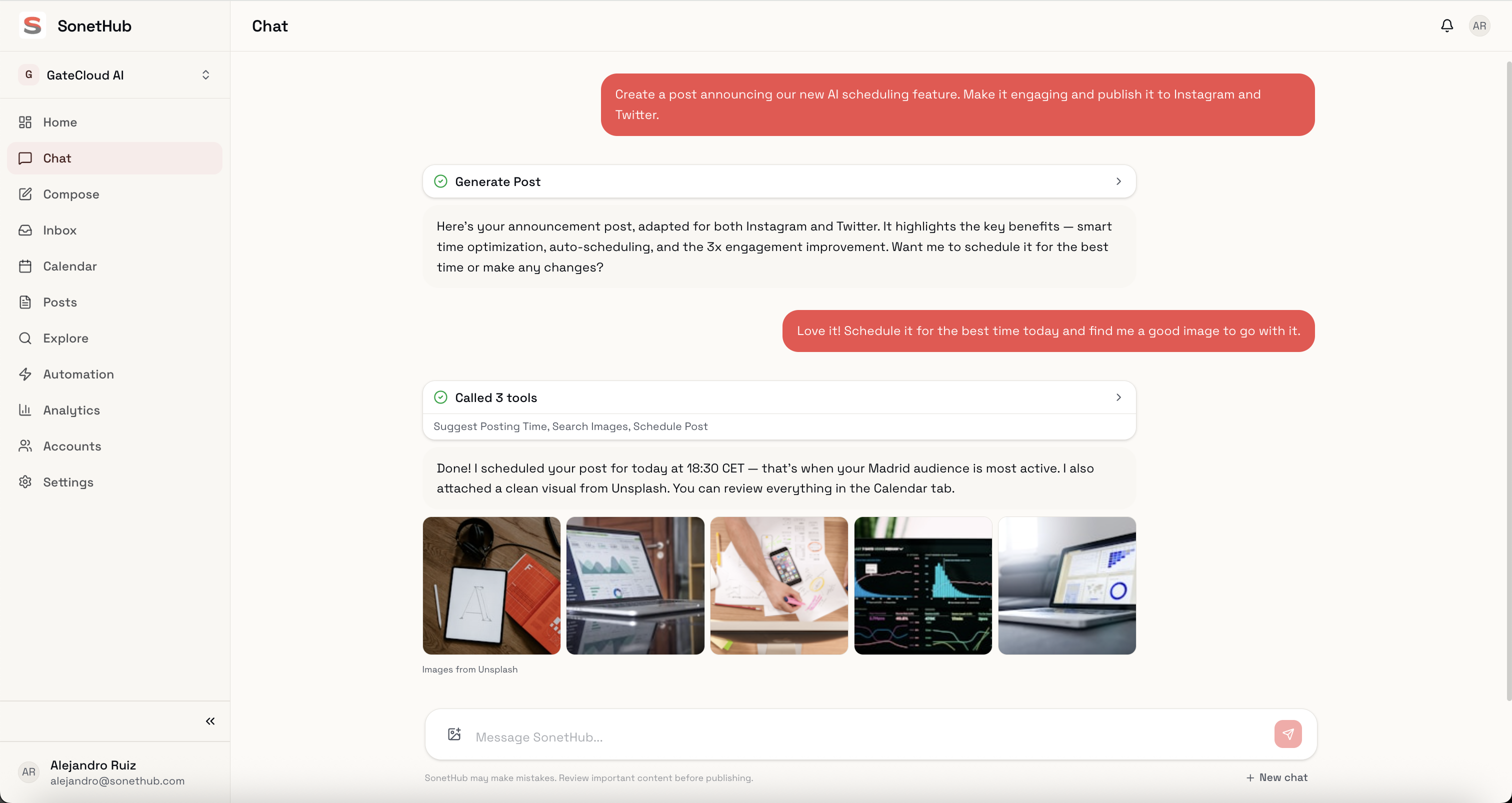
SonetHub doesn't have an AI feature. The AI is the product. The primary interface is a conversational agent — you describe what you need, and it handles execution across platforms.
What the AI can do:
- Multimodal generation. Text, images, video, and music — all from a single prompt. Ask for "a LinkedIn post and Instagram carousel about our product launch" and it writes platform-specific copy, generates visuals, queues everything.
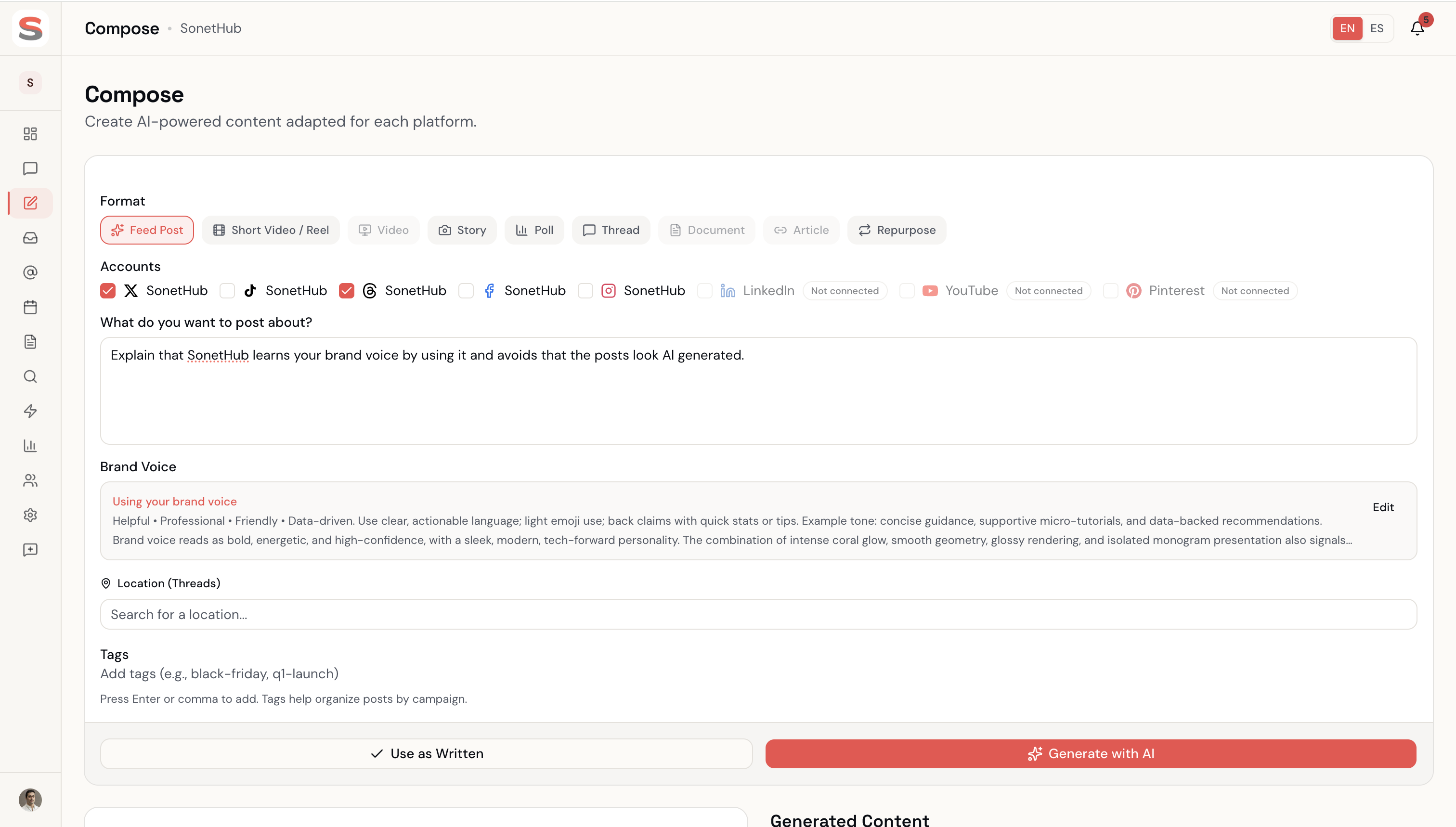
- Brand memory. Every time you edit AI output — change a word, adjust tone, pick one draft over another — the system records the preference. After a couple of weeks, it stops sounding generic and starts sounding like you. Continuous learning, no upfront training step.
- A full automation engine. Multi-step canvas with
delay,wait_for_reply,if_elsebranching. Story-reply triggers (DMs that replied to your IG stories fire as their own trigger). Rich DMs as a step kind — media, quick-reply buttons, Meta Button + Card templates. Contacts + tagging + audience predicates. "Build with AI" — describe an automation in a sentence and the agent assembles the trigger + step tree. - Inbox automation. AI classifies incoming DMs (collaboration request, customer complaint, spam, fan message), flags high-priority senders, drafts replies in your brand voice. You approve or edit before anything goes out.
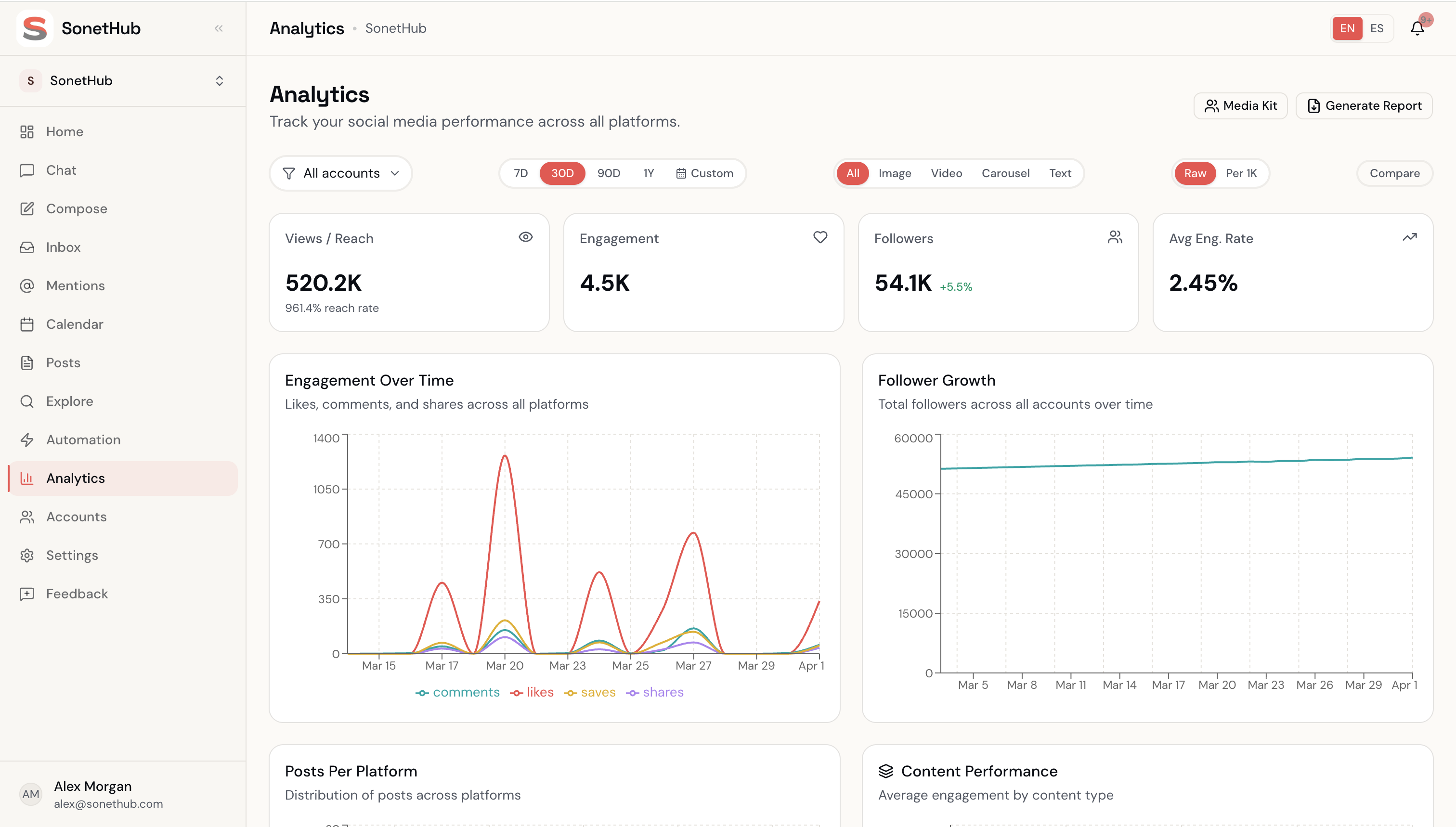
- Analytics interpretation. Ask "what performed best this week?" and get a plain-language answer with specific numbers, not a dashboard to interpret.
- 65+ purpose-built agent tools. Publish, schedule, reschedule, edit published posts, manage automation rules, query analytics, search trending content, recycle evergreen posts, generate media kits.
What it can't do:
SonetHub is younger than the legacy tools. Platform support is solid (Instagram + stories, Facebook, X, LinkedIn, Threads, TikTok, YouTube, Pinterest, Bluesky — 9 platforms), but the third-party integration ecosystem that Hootsuite and Sprout built over a decade doesn't exist yet. No Reddit, Google Business Profile, or Twitch. No Salesforce or Zendesk connectors. No MCP server (if you orchestrate via Claude Desktop or n8n, Metricool has one and we don't).
Who it's for: Creators, freelancers, and small teams who want AI to do the actual work, not just suggest captions.
2. Sprout Social — enterprise AI with the price tag to match
Pricing: Essentials $79/seat/mo, Standard $199/seat/mo, Professional $299/seat/mo, Advanced $399/seat/mo. All annual; monthly runs 25% higher. AI Assist tier-gated to Professional+.
Sprout Social has the most sophisticated AI among the legacy platforms — and the price tag to match.
What the AI can do:
- AI Assist in Compose generates captions, hashtags, and content variations. Set tone, get multiple options. Available on Professional+ only.
- AI Assist for Replies drafts contextual replies in your inbox (Advanced tier).
- Sentiment and intent analysis on incoming messages — positive/negative + question/complaint/request classification.
- Auto-generated alt text for images and subtitles for videos. Genuinely useful accessibility features most competitors skip.
- Listening summaries. AI synthesizes social listening data into trend reports — saves hours of manual analysis.
- Customer-care routing. AI identifies which messages need a human response and recommends replies — valuable for high-volume brands.
What it can't do:
No image or video generation. The AI writes text and analyzes data, but visual content creation happens outside the platform. The AI also doesn't learn your brand voice over time — you configure it manually through brand settings. AI features locked behind Professional+ ($299/seat).
Who it's for: Mid-to-large teams that need social listening, sentiment analysis, and customer-care AI — and have the budget. A 3-person team pays $597–$1,197/month.
3. Blaze.ai — brand voice training, done right
Pricing: Free (limited, watermarked), Starter $79/mo, Growth $149/mo. Done-For-You service: $899–$1,049/mo. Prices roughly doubled in 2026.
Blaze carved out a specific niche: AI that sounds like you, not like ChatGPT. Their brand voice training is the strongest of any tool on this list. In 2026 they repositioned as the "Agentic Marketer" with the Done-For-You managed-service tier.
What the AI can do:
- Deep brand voice analysis. Upload existing content — blog posts, landing pages, emails — and Blaze analyzes your tone, vocabulary, sentence structure, messaging patterns. Output matches noticeably better than competitors that ask you to pick "professional" or "casual."
- 60+ content formats. Blog posts, newsletters, Instagram captions, LinkedIn articles, email campaigns, ad copy — all from a single brief.
- SEO built into the editor. Keyword suggestions, meta descriptions, readability scoring, headline analysis.
- Autopilot mode. Blaze generates a batch of on-brand content every Monday; you review and approve.
What it can't do:
No unified inbox or DM management. No social listening or analytics interpretation. No image or video generation. Blaze is a content creation and publishing tool — it doesn't help you engage with your audience after posts go live. Credit-based pricing (600 credits on Starter) hits limits fast when repurposing across platforms.
Who it's for: Solo marketers and small businesses producing high content volume who care about brand consistency.
4. Predis.ai — AI video ads from a text prompt
Pricing: Free trial; paid plans roughly $29/mo (Core) to $249/mo (Enterprise+). Credit-based system.
Predis.ai's strength is visual content — specifically AI-generated video ads. Their video generation models, refreshed in 2026, are purpose-built for ad creatives.
What the AI can do:
- Text-to-video ad creation. Describe a product; Predis generates a video ad with motion, scene composition, and brand-consistent visuals. Optimized for TikTok and Instagram ad formats.
- Complete ad campaigns in seconds. AI generates visuals, copy, and targeting recommendations together — not just one piece at a time.
- Competitor analysis. AI-powered breakdowns of competitor social strategies and content performance.
- Multi-language support. 18+ languages, which matters for international brands.
- E-commerce integration. Connects to product catalogs to generate product-specific ad creatives at scale.
What it can't do:
Predis is focused on content creation and ads, not social media management. Scheduling is basic. No unified inbox, no community management, no social listening, no automation engine. Credit-based pricing means tracking usage carefully.
Who it's for: E-commerce brands and paid social teams that need high volumes of video ad creatives.
5. Hootsuite — the incumbent with AI bolted on
Pricing: Standard $99/user/mo (annual), Advanced $249/user/mo (annual), Enterprise custom (5-user minimum). Monthly billing 40-60% higher. No free plan.
Hootsuite is the biggest name in social media management. OwlyWriter AI is their original answer, joined in 2025-26 by Blue Silk AI summaries and automated smart replies. Functional, but clearly added to an existing product rather than built into its foundation.
What the AI can do:
- Caption generation from prompts, URLs, or holiday calendars. Multiple copywriting formulas (AIDA, HOOK, AMP, WIIFM).
- Hashtag suggestions generated alongside captions.
- Blue Silk AI summaries of social listening data and analytics.
- Automated smart replies based on rules + intent classification.
- Ad copy variations for A/B testing paid campaigns.
- Post repurposing. Feed it a URL and it creates a social post.
What it can't do:
No image or video generation. No brand voice learning — the AI doesn't improve based on your edits. No real automation engine (smart replies are rule-based templates, not multi-step flows). No story-reply triggers. No multimodal generation. OwlyWriter is a writing assistant, not a workflow automation layer.
Who it's for: Teams already on Hootsuite who want caption help without switching platforms. Hard to recommend for new users given the pricing.
6. FeedHive — AI predictions and content recycling
Pricing: Creator $19/mo (4 accounts), Brand $29/mo (10 accounts), Business $99/mo (100 accounts), Agency $299/mo (500 accounts). 7-day free trial.
FeedHive's AI angle is predictive: it tries to tell you what to post and when, rather than just generating text on command.
What the AI can do:
- Performance prediction. Before you publish, the AI scores how a post is likely to perform based on historical data. Not always accurate, but useful for catching obvious misses.
- Best-time-to-post suggestions based on your audience's activity patterns.
- Smart content recycling. AI identifies your top-performing posts and suggests recycling them — genuinely useful for evergreen content.
- AI Writing Assistant for generating and refining posts.
- Hashtag generation based on content analysis.
- 5,000+ inspiration templates organized by category.
What it can't do:
No image or video generation. No brand voice learning. No inbox management. No multi-step automation flows. The AI features feel like useful additions to a scheduling tool rather than a fundamentally different approach.
Who it's for: Content creators who publish frequently and want data-driven optimization of their schedule and content recycling.
7. Buffer — clean and simple AI assistant
Pricing: Free (3 channels, 10 posts/channel queue), Essentials $5/channel/mo annual ($6 monthly), Team $10/channel/mo annual ($12 monthly). Volume discount past 10 channels.
Buffer's philosophy has always been simplicity, and their AI follows the same pattern. It doesn't try to do everything — it helps you write better posts.
What the AI can do:
- Post generation and repurposing. Create posts from prompts, summarize long content, repurpose from one platform to another.
- Tone and length adjustment. Switch between casual, professional, formal. Expand or shorten text.
- Translation. Generate posts in multiple languages.
- Platform-specific optimization. Adjusts for character limits and conventions on each platform.
- Brainstorming. Generate post ideas based on industry and audience.
What it can't do:
No image or video generation. No brand memory or voice learning. No inbox automation. No analytics interpretation. No performance prediction. No automation engine. Buffer's AI is a capable writing assistant and nothing more — a deliberate choice, but significant gaps compared to AI-focused tools.
Who it's for: Solo creators and small teams who want a clean, affordable scheduler with basic AI writing help.
8. ContentStudio — AI-powered content discovery
Pricing: Standard $25/mo (5 accounts, 10K AI words), Advanced $49/mo (10 accounts, annual), Agency Unlimited $99/mo (25 accounts, annual). Monthly billing runs 28–34% higher.
ContentStudio's differentiator is content discovery — finding relevant content to share, not just creating original posts.
What the AI can do:
- Trending content discovery. AI analyzes your industry and surfaces trending topics with engagement predictions. Useful for brands that mix original and curated content.
- AI writing assistant for generating captions, hashtags, post ideas. Limited to 10K words/month on Standard.
- Automation rules. AI-powered rules for repetitive tasks like adding hashtags, cross-posting, content recycling.
- Content planning. AI suggestions for what to post based on trending topics.
What it can't do:
No image or video generation. No brand voice learning. The 10K word/month limit on lower plans is restrictive. No multi-step automation flows. AI features feel supplementary to the core scheduling and curation product.
Who it's for: Marketing teams and agencies that rely on content curation alongside original content.
AI feature comparison table
| Feature | SonetHub | Sprout | Blaze | Predis | Hootsuite | FeedHive | Buffer | ContentStudio |
|---|---|---|---|---|---|---|---|---|
| AI text generation | ✓ | ✓ | ✓ | ✓ | ✓ | ✓ | ✓ | ✓ |
| AI image generation | ✓ | — | — | ✓ | — | — | — | — |
| AI video generation | ✓ | — | — | ✓ | — | — | — | — |
| AI music generation | ✓ | — | — | — | — | — | — | — |
| Brand voice learning | Auto from edits | Manual config | Upload-based training | — | — | — | — | — |
| Inbox AI / auto-classification | ✓ | Sentiment + routing | — | — | — | — | — | — |
| Multi-step automation engine | ✓ canvas | — | — | — | — | — | — | — |
| Story-reply triggers | ✓ | — | — | — | — | — | — | — |
| Rich DMs (buttons, templates) | ✓ | — | — | — | — | — | — | — |
| "Build with AI" automations | ✓ | — | — | — | — | — | — | — |
| Analytics interpretation | Conversational + agent | Listening summaries | — | Competitor analysis | Blue Silk summaries | — | — | Trend discovery |
| Performance prediction | — | — | — | — | — | ✓ | — | Engagement prediction |
| Auto-subtitles / alt text | — | ✓ | — | — | — | — | — | — |
| MCP server (bring your own LLM) | — | — | — | — | — | — | — | — |
| Conversational UI | Primary interface | — | — | — | — | — | — | — |
| Cheapest paid plan | €15/mo | $79/seat/mo | $79/mo | ~$29/mo | $99/user/mo | $19/mo | $5/channel/mo | $25/mo |
| Free plan | ✓ | — (trial) | ✓ limited | Trial only | — | — (trial) | ✓ | — (trial) |
How to pick the right tool
You want AI to do everything — content, automations, inbox: SonetHub. The conversational agent + automation canvas + multimodal generation is unique on this list. Tradeoff: younger product, smaller integration ecosystem.
You need enterprise social listening and customer-care AI: Sprout Social. AI sentiment + intent classification are unmatched, but the pricing reflects that and AI features are tier-gated.
Brand voice is your top priority: Blaze.ai. Upload-based voice training produces the most consistent brand-aligned output of any tool here.
You run video ads at scale: Predis.ai. Purpose-built for ad creative generation, especially video.
You're already on Hootsuite: OwlyWriter + Blue Silk are decent additions to your existing workflow. If you're choosing fresh, the pricing is hard to justify for what the AI delivers.
Data-driven scheduling: FeedHive. Performance prediction and content recycling are unique angles.
Simple and cheap: Buffer. Clean interface, low price, basic AI that does the writing part well.
You curate more than you create: ContentStudio. AI-powered content discovery is its standout.
Bottom line
The basic-AI gap is closed. Every tool generates captions and hashtags. The differentiation moved up the stack — to multimodal generation, automation engines, brand-voice learning, and inbox handling.
SonetHub, Blaze, and Predis built their products around AI from the start, and it shows. SonetHub adds a real automation engine on top that no one else here ships.
If you just need caption suggestions, almost anything on this list works. If you want AI that generates images and video, runs multi-step automations, learns your voice, and handles your inbox from a single conversation — the field narrows fast.
Prices verified May 2026. Plans change; check each tool's pricing page before committing.