Hootsuite starts at $99/user/month (annual billing) for Standard and goes to $249/user/month for Advanced — Enterprise is custom with a 5-user minimum. There's no free plan. With a 1.5-star Trustpilot rating driven by billing complaints, a lot of people are looking for alternatives.
We tested 8 of them. Here's what each one actually costs in 2026, what it does well, and who should use it.
Why people leave Hootsuite
Three reasons keep coming up:
- Price. $99/user/month is the floor; $249 on Advanced. A 3-person team on Advanced pays $747/month. That's $9,000/year for a scheduling tool with an AI button.
- Per-seat billing. Every team member multiplies your cost. Kills the economics for agencies and growing teams.
- AI that's a sidebar. OwlyWriter generates captions, Blue Silk summarizes listening data, automated smart replies template-reply on rules. It doesn't generate images, doesn't create video, doesn't ship a real automation engine, doesn't learn your brand voice.
Hootsuite still works for enterprises with big budgets and deep integrations. For everyone else, here are the better options.
1. SonetHub — Best for AI-native social media management
Pricing: Free (€0) | Starter €15/mo | Growth €29/mo | Pro €59/mo | Business €129/mo
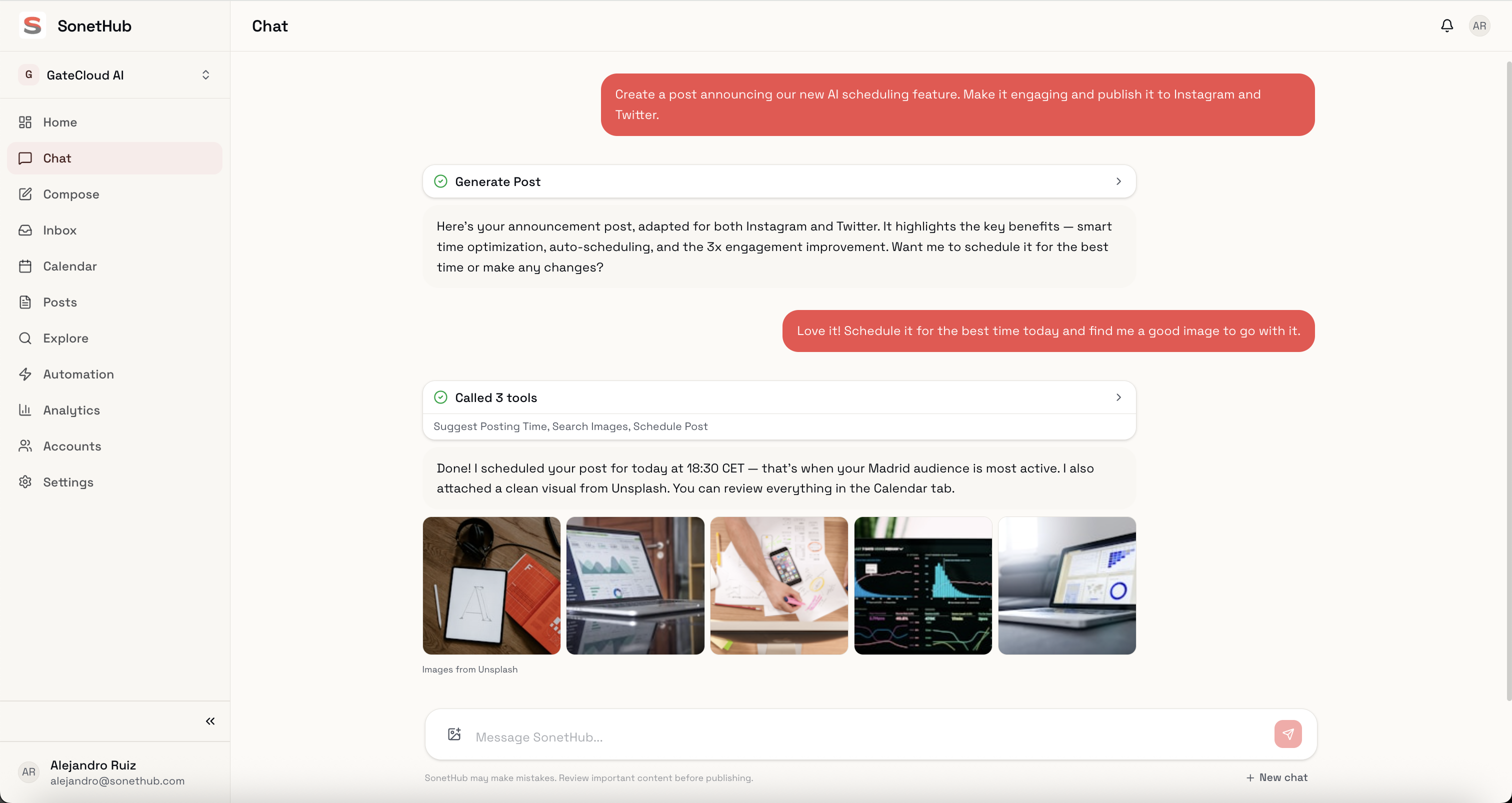
SonetHub is built differently from every other tool on this list. There's no traditional dashboard — the AI is the interface. Describe what you need in a conversation, and the agent handles it: writes the copy, generates images or video, formats each post for the target platform, schedules everything.
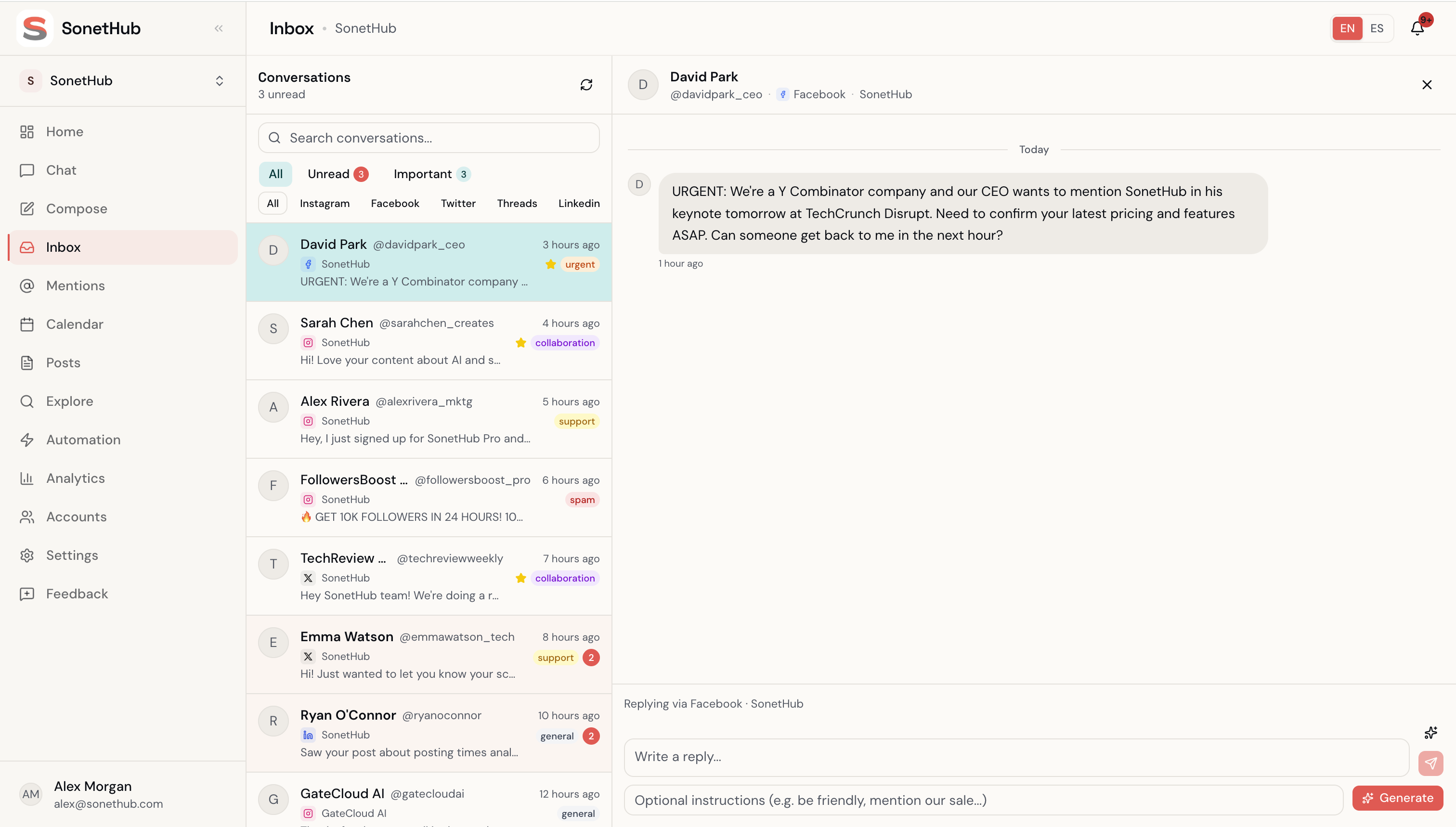
It's also the only tool here that ships a real automation engine — a node-graph canvas with multi-step flows, story-reply triggers (DMs that replied to your IG stories fire as their own trigger), rich DMs with quick-reply buttons + Meta-native Button/Card templates, and a contacts + tagging layer.
What stands out:
- AI generates text, images, video, and music — not just captions
- Brand memory that learns your tone and style from your edits continuously
- Multi-step automation canvas with
delay,wait_for_reply,if_elsebranching - Story-reply triggers + rich DMs (buttons, templates) — ManyChat-style features for IG/FB
- Contacts + tagging + audience predicates layer
- "Build with AI" — describe an automation in a sentence; the agent assembles it
- Flat pricing with no per-seat fees. Pro at €59/mo includes 5 team members
- Supports 9 platforms: Instagram (+ stories), Facebook, X, LinkedIn, Threads, TikTok, YouTube, Pinterest, Bluesky
- EU-based (Spanish legal entity, GDPR-native)
Where it falls short:
- Younger product with a smaller integration ecosystem than established players
- Not built for 500-person enterprise marketing departments
- No Reddit, Google Business Profile, or Twitch yet
Best for: Creators, freelancers, small businesses, and agencies that want AI doing the heavy lifting — content creation, inbox automation, multi-step flows — instead of just suggesting captions.
Free tier: Yes — 2 accounts, 3 publishes/day (no monthly cap), full AI chat access.
2. Buffer — Best for simple scheduling
Pricing: Free | Essentials $5/channel/mo annual ($6 monthly) | Team $10/channel/mo annual ($12 monthly)
Buffer's strength is that it's dead simple. Clean interface, basic scheduling, stays out of your way. The per-channel pricing is transparent and cheap for small accounts. 3 channels on Essentials annual: $15/month. But it scales linearly — 10 channels on Team annual is $100/month, 20 channels is $200/month.
What stands out:
- Genuinely easy to use — minimal learning curve
- Supports 12 platforms including Threads, Bluesky, Mastodon, Pinterest, Google Business
- AI Assistant included free on all plans (text generation, tone adjustment, translation)
- Volume discount kicks in past 10 channels ($3.33/channel annual on channels 11-25)
Where it falls short:
- No unified inbox for DMs (Reply tool covers comments only)
- Analytics are basic
- AI generates text only — no image, video, or automation engine
- Per-channel pricing gets expensive at scale
Best for: Solo creators and small businesses with 2-3 platforms who want a no-fuss scheduler. If you don't need inbox automation or content generation beyond text, this is it.
3. Later — Best for visual-first Instagram brands
Pricing (annual): Starter $18.75/mo | Growth $37.50/mo | Scale $82.50/mo
Later started as an Instagram scheduler and it still shows. The visual planner with drag-and-drop calendar is best-in-class for planning a visually cohesive feed. If aesthetics matter (fashion, food, travel, design), Later's grid preview is genuinely useful. They've also repositioned in 2026 toward influencer marketing with creator search and campaign tracking tooling.
What stands out:
- Visual content calendar and Instagram grid preview — nobody does this better
- Linkin.bio for turning your feed into a clickable landing page
- New 2026 influencer-marketing surface (creator search, campaign tracking)
- Smart scheduling with Future Trends
Where it falls short:
- No free plan — 14-day trial only
- Starter caps you at 30 posts/profile + 5 AI credits/month
- No YouTube, Threads, or Bluesky scheduling
- No unified social inbox
- No automation engine
Best for: Visual brands, Instagram-heavy creators, e-commerce businesses where feed aesthetics are part of the strategy. Also a real option for brands running influencer campaigns.
4. Sprout Social — Best enterprise analytics
Pricing (annual): Essentials $79/seat/mo | Standard $199/seat/mo | Professional $299/seat/mo | Advanced $399/seat/mo
Sprout Social is the expensive option. Essentials starts at $79/seat (new in 2026), with Standard $199, Professional $299, Advanced $399. A 3-person team on Standard pays $597/month. That's not a typo.
But if you need serious analytics, compliance features, and executive-ready reporting, Sprout delivers. Their reports are polished and deep. Social listening is now custom-priced — the old "$999/mo minimum" was replaced with negotiated quotes that typically run $1,000–$3,500+/month.
What stands out:
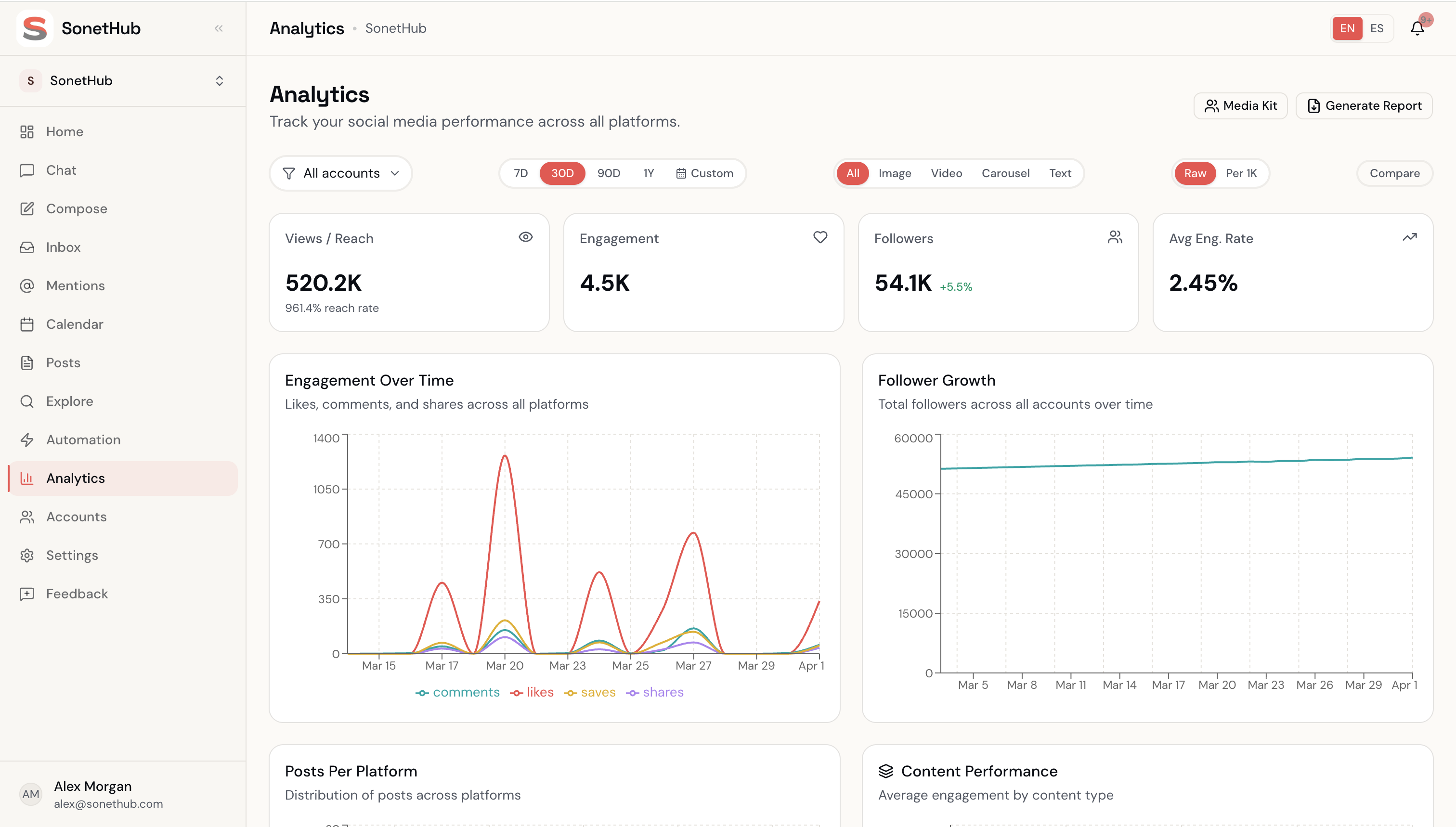
- Best-in-class analytics and reporting — presentation-ready out of the box
- Social listening across the open web (custom-priced add-on)
- Strong approval workflows and compliance tools
- Smart Inbox with case routing, internal tasking, SLA tracking
- AI Assist for posts and replies on Professional+
Where it falls short:
- Pricing is brutal. Per-seat billing punishes growing teams
- AI features tier-gated to Professional ($299/seat) and Advanced ($399/seat)
- No image, video, or music generation
- The value-per-dollar ratio is the lowest on this list unless you're an enterprise
Best for: Mid-to-large companies with dedicated social media teams and a real budget. If your CEO wants polished monthly reports and your industry requires compliance, Sprout earns its price. Everyone else, look elsewhere.
5. Blaze.ai — Best for AI content writing + repurposing
Pricing: Free (limited, watermarked) | Starter $79/mo | Growth $149/mo | Done-For-You $899–$1,049/mo
Blaze.ai is an AI marketing platform that's repositioned in 2026 as the "Agentic Marketer" — content strategy + voice-trained generation + managed services. Their brand-voice training is the strongest among writing-focused tools: feed it your existing content, it builds a voice profile, output sounds like you with light edits.
Prices roughly doubled in 2026 (Starter was $39, now $79). The Done-For-You tier ($899–$1,049/mo) is a managed agency-style service.
What stands out:
- Brand-voice analysis and consistent tone across platforms (genuinely strong)
- Content repurposing: one blog post → 10+ assets across platforms
- Long-form writing (2,000-word posts, email sequences)
- Done-For-You managed service for buyers who want output without operating a tool
- WordPress + Mailchimp integration
Where it falls short:
- No image or video generation — text and static images only
- No unified inbox or automation engine
- Credit-based AI (600 credits on Starter goes fast when repurposing across platforms)
- Content from Blaze often gets flagged by AI-detection tools
Best for: Solopreneurs and small businesses where writing is the bottleneck. If you publish long-form (blogs, newsletters, emails) and want AI assistance there, Blaze is built for that.
6. SocialBee — Best for content recycling
Pricing (annual): Bootstrap ~$24/mo | Accelerate ~$41/mo | Pro ~$83/mo
SocialBee's killer feature is content categories. Organize posts into buckets like "Educational," "Promotional," "Behind the scenes," "Community" — define how often each category should post, and SocialBee handles the mix automatically. Evergreen content recycles on a schedule.
What stands out:
- Category-based scheduling with automatic content recycling
- Supports 10 platforms including Pinterest, Threads, Bluesky, Google Business
- AI assistant generates post ideas and variations
- Canva integration built in
Where it falls short:
- No unified inbox
- Analytics adequate but not deep
- AI generates text only — no image or video
- No automation engine for inbox / comments
Best for: Small business owners and solopreneurs who want to maximize a small content library. If you have 50 great posts and want them rotating on autopilot, SocialBee's category system is exactly that.
7. Sendible — Best for agencies (white-label)
Pricing: Creator $29/mo | Traction $89/mo | Scale $199/mo | Advanced $299/mo | Enterprise $750/mo (~15% off annually)
Sendible was built for agencies and it shows. The white-label dashboard lets you connect Sendible to your domain with your brand colors — clients see your brand, not Sendible's. That alone makes it worth considering if you run an agency.
What stands out:
- White-label dashboards — the only fully brandable tool on this list
- Unlimited scheduling on all plans
- Strong client collaboration (approvals, permissions, tasks)
- Wide platform support including Google Business, Threads, Bluesky
Where it falls short:
- No free plan — 14-day trial only
- No Pinterest
- AI features basic compared to newer tools
- Steep price jumps between tiers
Best for: Social media agencies managing multiple clients that need white-label reporting and client-facing dashboards.
8. Agorapulse — Best for community management
Pricing (annual): Free (limited) | Standard $79/user/mo | Professional $119/user/mo | Advanced $149/user/mo
Agorapulse has the best social inbox on this list. Every comment, mention, DM, and review across all platforms lands in one place with labels, filters, saved replies, assignment rules. If community management is core to your role, Agorapulse makes it efficient.
The Report Studio lets you build custom reports, and ROI tracking connects social engagement to web traffic and conversions.
What stands out:
- Best-in-class social inbox with moderation rules, labels, assignment
- ROI tracking tying social engagement to business outcomes
- Customizable Report Studio
- 30-day free trial
Where it falls short:
- Per-user pricing means costs scale with team size
- Additional social profiles cost $15 each beyond what's included
- AI features limited compared to SonetHub or Blaze
- No image or video generation
- No multi-step automation flows
Best for: Brands where community management is the priority. If you spend more time responding to comments and DMs than creating content, Agorapulse's inbox is worth the per-seat price.
Free tier: Yes — 3 social profiles, 1 user, basic features.
The comparison table
| Tool | Starting price | Free plan | Pricing model | AI: text | AI: image/video | Automation engine | Platforms |
|---|---|---|---|---|---|---|---|
| SonetHub | €0 | Yes | Flat rate | ✓ + agent | ✓ image + video + music | ✓ multi-step canvas | 9 |
| Buffer | $0 | Yes | Per channel | ✓ | — | — | 12 |
| Later | $18.75/mo | No | Tiered | Limited credits | — | — | 8 |
| Sprout Social | $79/seat/mo | No | Per seat | ✓ tier-gated | — | — | 9 |
| Blaze.ai | $0 | Yes | Tiered | ✓ + voice-trained | — | — | 5 |
| SocialBee | ~$24/mo | No | Tiered | ✓ | — | Category recycling only | 10 |
| Sendible | $29/mo | No | Tiered | Basic | — | — | 9 |
| Agorapulse | $0 | Yes | Per user | Basic | — | Moderation rules only | 8 |
How to pick
Solo creator on a budget: Buffer (free or $5/channel) or SonetHub (free, with AI that actually creates content + automations).
Visual brand on Instagram: Later. The grid planner and Linkin.bio are worth it.
Running an agency: Sendible for white-label client dashboards, or SonetHub if flat pricing + the automation engine matter more than white-labeling.
Deep analytics and exec reports: Sprout Social — if the budget allows.
Want AI to do the actual work, not just suggest captions: SonetHub. It's the only tool here where AI generates text, images, and video in one conversation AND ships a real automation engine.
Content recycling on autopilot: SocialBee. The category system is unique and well-executed.
Community management is your main job: Agorapulse. The inbox is the best in the business — unless you want automation rules handling replies for you, in which case SonetHub's automation canvas does more.
AI content strategy and voice training: Blaze.ai. Long-form writing + voice matching is their strength.
The bottom line
Hootsuite priced itself out of the market for anyone who isn't an enterprise. $99–$249/user/month with no free plan is asking 2016 prices for a 2016 experience — a scheduling dashboard with an AI button.
Every tool on this list does something better than Hootsuite at a lower price point. The right choice depends on what you actually need. Don't pay for enterprise features you'll never use.
All prices exclude applicable taxes.